
Video Conference Tips: How to Run Successful and Secure Online Meetings
A successful video conference depends on preparation, clear communication, and the right setup. Poor audio, weak lighting, or bad etiquette can quickly ruin a meeting. With the right video conference tips, you can improve focus, avoid distractions, and keep meetings productive. Whether you are hosting a business call, team meeting, or virtual presentation, small improvements can make a big difference in how professional and effective you appear.
Table of Contents
What Is Video Conferencing Software?
Video conferencing software allows people to meet face-to-face online using video, audio, and screen sharing. These tools connect participants from different locations in real time. Popular platforms include Zoom, Microsoft Teams, Google Meet, and Webex.
Most video conferencing software supports features such as chat, file sharing, meeting recording, and virtual backgrounds. Businesses rely on these tools for collaboration, interviews, training, and client meetings. When used correctly, video conferencing saves time, reduces travel costs, and improves communication across teams.
Why Video Conference Tips Are Important for a Successful Meeting
Even the best software cannot guarantee a successful video conference without proper behavior and setup. Poor etiquette, technical issues, or lack of focus can make meetings frustrating.
Good video conference tips help meetings stay organized and respectful. They also ensure everyone feels included, especially remote participants. When meetings run smoothly, teams communicate better and decisions happen faster.
Tips to Improve a Video Conferencing Meeting If You Are Onsite
When you join a video conferencing meeting from an office or conference room, your environment plays a big role in how effective the meeting will be. Onsite participants often forget that remote attendees rely fully on audio and video quality to stay engaged. Small setup mistakes can make it hard for others to follow the discussion.
Start by choosing a quiet room with minimal background noise. Even office chatter or keyboard sounds can distract remote participants. Make sure the microphone and speakers are tested before the meeting begins. Poor audio is one of the biggest reasons video meetings fail.
Camera placement is equally important. The camera should capture all speakers clearly and be positioned at eye level. Avoid placing it too far away or too high. Proper lighting helps remote participants see facial expressions and body language, which improves communication.
To make onsite meetings more inclusive and productive:
- Speak clearly and avoid talking over others
- Pause regularly to allow remote participants to respond
- Use a shared screen so everyone can see the same content
- Assign someone to monitor chat messages and questions
- Keep side conversations to a minimum
When onsite teams stay aware of remote attendees, meetings feel balanced and more collaborative.
Tips to Improve a Video Conferencing Meeting If You Are Remote
Remote participants must rely on their personal setup to stay professional and engaged. A stable connection, clear audio, and good lighting help ensure you are seen and heard without distractions. Preparing your space before the meeting starts sets a positive tone.
Choose a quiet location and inform others nearby that you are in a meeting. Background noise can make it hard for others to follow your points. Sit facing a light source, such as a window or lamp, to avoid shadows on your face. Position the camera at eye level to create natural eye contact.
Being active and attentive also improves remote meeting quality. Keep your camera on when possible, listen carefully, and avoid multitasking. This shows respect and helps prevent misunderstandings.
To improve your remote video conferencing experience:
- Test your internet, microphone, and camera beforehand
- Use headphones to reduce echo and background noise
- Mute yourself when not speaking
- Use chat or hand-raise features to avoid interruptions
- Take brief notes to stay focused
When remote participants are prepared and engaged, video conferencing meetings become smoother, clearer, and more effective for everyone.
Video Conferencing Etiquette
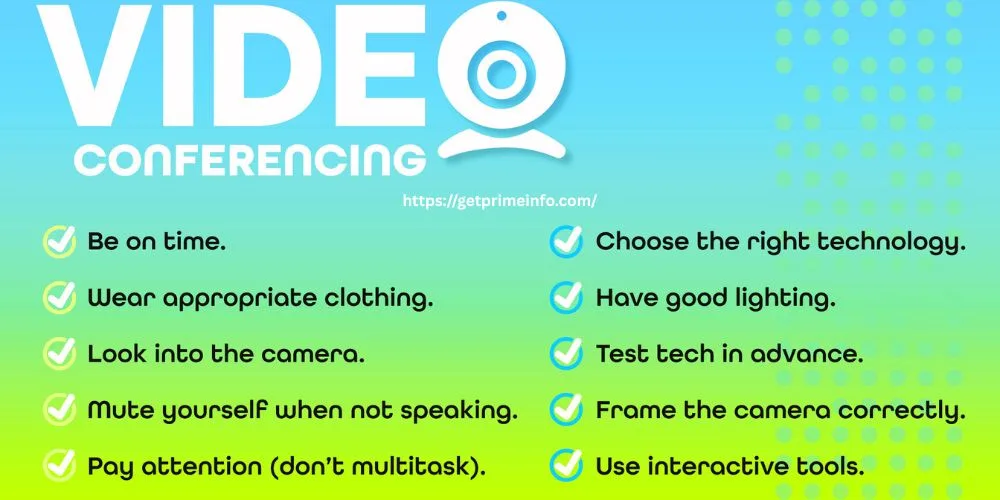
Professional etiquette is the foundation of any successful video conference. Simple habits can improve clarity, reduce interruptions, and create a better experience for everyone involved.
1. Mute Yourself When Not Speaking
Background noise is one of the biggest distractions in video meetings. Even small sounds can interrupt the flow of conversation. Muting your microphone when you are not speaking keeps meetings clean and focused.
Unmute only when you need to speak, and mute again when finished. This small habit shows respect for others and improves audio quality.
2. Be on Time
Joining a meeting late disrupts the discussion and wastes time. Being on time shows professionalism and respect. Log in a few minutes early to check your audio and video.
If you are hosting the meeting, start on time even if some participants are late. This sets clear expectations and keeps meetings efficient.
3. Ensure Your Technology Works Correctly
Technical problems can ruin first impressions. Test your microphone, camera, and internet connection before the meeting starts. Make sure your device is fully charged or plugged in.
Using updated software reduces crashes and compatibility issues. A stable setup helps meetings run without unnecessary interruptions.
4. Use Technology to Fully Engage Remote Participants
Video conferencing tools offer features designed to improve engagement. Screen sharing, polls, chat, and reactions help participants stay involved.
Encourage remote participants to speak, ask questions, and share feedback. A successful video conference includes everyone, not just the loudest voices.
5. Choose the Proper Software and Hardware
Not all video conferencing software works the same. Choose a platform that fits your meeting size, security needs, and features. For professional meetings, use a good webcam and a quality microphone.
Clear video and audio improve understanding and reduce fatigue. Investing in proper hardware pays off over time.
6. Wear Work-Appropriate Clothing
Your appearance matters, even in virtual meetings. Wear clothing that matches the tone of the meeting. Business meetings require professional attire, while casual team calls may allow relaxed clothing.
Avoid loud patterns or bright colors that distract on camera. Dressing well boosts confidence and credibility.
7. Frame the Camera Correctly
Camera positioning affects how you appear to others. Place the camera at eye level and frame yourself from the chest up. This creates a natural and professional look.
Avoid extreme angles or sitting too close to the camera. A well-framed shot helps maintain eye contact and engagement.
8. Set Up Your Space With Optimal Lighting
Good lighting improves video quality instantly. Face a natural light source or use a soft lamp placed in front of you. Avoid strong backlighting from windows.
Poor lighting makes you look tired or unclear. A well-lit space helps participants focus on what you are saying.
9. Look Into the Camera
Looking into the camera creates the feeling of eye contact. This builds trust and connection during virtual meetings. While it feels natural to look at the screen, try to glance at the camera when speaking.
This small adjustment makes communication feel more personal and engaging.
10. Pay Attention
Multitasking during video calls is obvious and disrespectful. Avoid checking emails, phones, or other tabs. Give the meeting your full attention.
Active listening improves understanding and reduces repeated questions. Focused participants lead to better discussions and faster decisions.
Better Video Conference Tips for Productive Meetings
Beyond etiquette, thorough preparation significantly enhances meeting outcomes. Set a clear agenda and share it before the call. This helps participants prepare and stay focused.
Limit meeting length whenever possible. Shorter meetings encourage attention and efficiency. End meetings with clear next steps so everyone knows what to do afterward.
Cybersecurity Risks in Video Conferencing
Video conferencing security is often overlooked. Risks include unauthorized access, data leaks, phishing links, and meeting hijacking. Weak passwords and public meeting links increase these risks.
Businesses must incorporate video conferencing into their overall cybersecurity strategy. Protecting meetings protects sensitive conversations and data.
Related Topics: Do I need antivirus for Android 2026? a complete guide.
Secure Video Conferencing Best Practices
Security does not have to be complicated. Use strong passwords and enable waiting rooms for meetings. Limit screen sharing permissions to hosts or presenters.
Avoid sharing meeting links publicly. Keep software updated to fix security vulnerabilities. These simple steps greatly reduce risk.
Who Says Business Security Has to Be Hard?
Modern video conferencing software includes built-in security tools. Features like encryption, meeting locks, and authentication are easy to use.
Following basic security practices protects meetings without slowing teams down. Security works best when it is simple and consistent.
Most Secure Video Conferencing Software
Some platforms focus heavily on security. Microsoft Teams, Zoom with proper settings, Google Meet, and Webex offer encryption and access controls.
The most secure video conferencing software depends on your needs. Business users should choose platforms that meet compliance and privacy requirements.
CISA Guide for Securing Video Conferencing
The Cybersecurity and Infrastructure Security Agency (CISA) provides guidance on secure video conferencing. It recommends strong passwords, updated software, and restricted access.
Following CISA recommendations helps organizations reduce cyber risks and protect virtual meetings.
Better Meetings Start Here
Better meetings start with preparation, respect, and smart use of technology. Clear agendas, good etiquette, and secure tools create successful video conferences.
Small improvements in behavior and setup lead to better communication and stronger collaboration.
Stay Connected on All Things Collaboration
Video conferencing continues to evolve. Staying informed about new features and best practices helps teams work better together.
Strong collaboration tools combined with smart habits lead to more productive meetings and better results.
Final Thoughts
Strong video conference tips improve communication, professionalism, and security. A successful video conference depends on etiquette, preparation, and the right technology. Simple habits like muting microphones, using good lighting, and staying focused make meetings smoother. When combined with secure practices and reliable software, video conferencing becomes a powerful tool for collaboration rather than a daily frustration.
(FAQs)
1. What are the tips for video conferencing?
Good video conferencing tips include joining on time, muting when not speaking, using proper lighting, and testing your audio beforehand. Stay focused, avoid multitasking, and follow basic etiquette to keep meetings professional and productive.
2. How can I look better on a video conference?
To look better on a video conference, sit facing natural light, position the camera at eye level, and keep the background clean. Wear solid colors, maintain good posture, and look into the camera while speaking.
3. Which is the best platform for video conferencing?
The best video conferencing platform depends on your needs. Zoom is popular for large meetings, Microsoft Teams works well for business collaboration, Google Meet is simple and browser-based, and Webex focuses on security.
4. How should I position the camera for a video conference?
Place the camera at eye level and frame yourself from the chest upward. Avoid low or high angles. A centered camera position creates natural eye contact and makes you appear more professional.
5. What are the disadvantages of video conferencing?
Video conferencing can cause fatigue, technical issues, and reduced personal connection. Poor internet, background noise, and lack of body language can also make communication less effective.
6. What is WhatsApp video call etiquette?
WhatsApp video call etiquette includes asking before calling, muting when not speaking, using a stable internet connection, and avoiding calls in noisy places. Keep calls short and respectful of the other person’s time.
7. What is video conferencing etiquette?
Video conferencing etiquette means being on time, dressing appropriately, muting background noise, and giving full attention. It also includes respecting turn-taking and using chat or hand-raise features properly.
8. How do you avoid awkwardness on video calls?
Avoid awkwardness by greeting participants clearly, keeping your camera steady, and maintaining eye contact. Having a clear agenda and knowing when to speak also helps conversations flow naturally.
9. What equipment do I need for better video calls?
For better video calls, use a good webcam, a clear microphone or headset, stable internet, and proper lighting. These tools improve audio clarity, video quality, and overall communication.
10. How do I reduce background noise during video meetings?
Reduce background noise by muting your microphone when not speaking, using headphones, and choosing a quiet room. Noise-canceling microphones also help improve sound quality.
11. Is it better to keep the camera on during video meetings?
Yes, keeping the camera on improves engagement and communication. It helps build trust and shows attention, especially in professional or collaborative meetings.
12. How long should a video conference meeting last?
Most video meetings should last between 30 and 60 minutes. Shorter meetings help reduce fatigue and keep participants focused and productive.
13. Can video conferencing be secure?
Yes, video conferencing can be secure when you use strong passwords, enable waiting rooms, and keep software updated. Choosing platforms with encryption also improves security.
14. How do I stay focused during long video calls?
Stay focused by minimizing distractions, taking notes, and actively participating. Short breaks and clear meeting goals also help maintain attention.
15. What makes a successful video conference?
A successful video conference combines good preparation, clear communication, proper etiquette, and reliable technology. When participants are engaged and organized, meetings become more effective.