
Do I need antivirus for Android 2026? a complete guide

Yes, you may need an antivirus for Android depending on how you use your phone. Android phones already have basic protection, but they are not fully safe from malware, phishing, or risky apps. If you download apps outside the Play Store, use public Wi-Fi, or store sensitive data, extra Android antivirus protection can reduce risks. In 2026, mobile threats are becoming increasingly sophisticated, and security increasingly depends on user behavior rather than the device itself.
Table of Contents
Why People Ask: Do I Need Antivirus for Android?
Android phones are powerful computers that people use for banking, work emails, passwords, photos, and personal messages. Because so much sensitive data is stored on one device, many users ask, do I need an antivirus for Android in 2026 complete guide, to understand how real the security risks are today.
Some people believe Android phones cannot get viruses at all, while others think antivirus apps only slow phones down. The reality sits between these two views. Android is much safer than it used to be, but it is still not completely immune to malware, phishing attacks, or risky apps.
This question usually comes from users who want peace of mind. They want clear guidance on whether Android’s built-in security is enough in 2026 or if installing a mobile antivirus app actually provides meaningful protection.
Do Android Phones Get Viruses?
Yes, Android phones can get viruses, but not in the same way as computers. Most Android threats come as malware, spyware, adware, or ransomware rather than classic viruses.
These threats can steal data, show unwanted ads, track your activity, or lock your phone. Android malware protection is necessary because attackers now target mobile users more than ever.
So when people ask, “Do Android phones get viruses easily?” the real answer is that they get infected mostly through unsafe behavior, not by default.
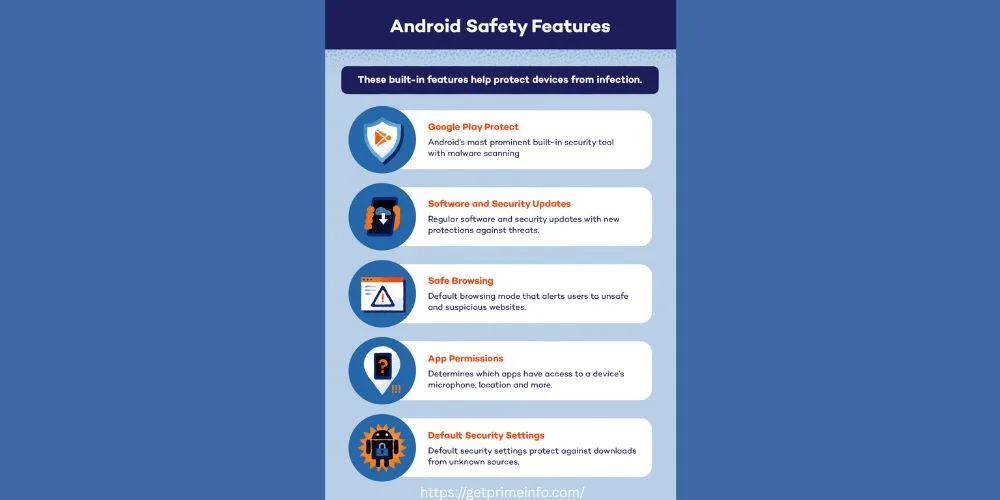
Android Safety Features
Android is often described as less secure, but this is not entirely true. Modern Android devices include several strong security features that work together to protect users from malware, phishing, and unauthorized access. When these features are enabled and updated, they significantly reduce security risks.
The main issue is not the lack of protection, but how users manage and use these built-in tools.
Google Play Protect
Google Play Protect is the most important security feature built into Android. It works silently in the background and scans apps before and after installation. Every app on the Google Play Store is checked for harmful behavior, and Play Protect continues to monitor apps already installed on your phone.
It also scans sideloaded apps, which means apps installed outside the Play Store are not ignored. If Play Protect detects suspicious activity, it warns the user and may disable or remove the app. While it is effective against common threats, it may not always catch advanced spyware or newly released malware immediately.
This is why Play Protect is a strong foundation, but not a complete security solution on its own.
Software and Security Updates
Android security updates play a critical role in protecting devices. These updates fix known vulnerabilities that hackers actively exploit. Google releases security patches regularly, but the delivery depends on phone manufacturers and carriers.
Unlike Apple, where updates reach all devices at once, Android updates can be delayed or skipped on older or budget phones. This delay creates security gaps. To stay protected, users should enable automatic updates and install them as soon as they are available.
Phones that no longer receive updates are more vulnerable and should be used with extra caution.
Related post: Pentagon Big Tech Tesla Cybertruck 2026 What This Unusual Connection Really Means.
Safe Browsing on Android
Android includes built-in safe browsing protection, especially when using Google Chrome, which plays an important role in answering the question, do I need an antivirus for Android in 2026 complete guide. This feature warns users before opening dangerous websites, phishing pages, or downloads that may contain malware.
Phishing attacks remain one of the most common Android security risks today. Fake websites often look real and are designed to steal login details, banking information, or personal data. Safe browsing helps block many of these threats, but it works best when the browser and Android system are fully updated and used alongside smart browsing habits.
Avoiding unknown links and suspicious ads further strengthens protection.
App Permissions Management
App permissions are one of the most powerful security controls on Android. They decide what apps can access, such as your camera, microphone, contacts, location, and files.
In newer Android versions, permissions are more detailed and allow one-time or limited access. This helps prevent apps from collecting unnecessary data. Users should regularly review permissions and remove access that does not make sense.
For example, a calculator app does not need access to your contacts or microphone. Unnecessary permissions are often a warning sign of risky apps.
Default Security Settings
Android devices come with default restrictions that block app installations from unknown sources. If a user tries to install an app outside the Play Store, Android clearly warns them and requires manual approval.
This feature is designed to prevent accidental malware infections. Disabling it permanently increases risk. It should only be overridden when installing trusted apps from reliable developers.
Keeping default security settings enabled is one of the easiest ways to avoid Android malware.
Additional Security Measures on Android
Android includes several advanced security features that work quietly in the background to protect users.
Google Play System Updates allow Google to push critical security fixes directly to devices, even if manufacturers delay updates. This reduces long-term risks.
Data encryption protects personal information stored on the phone. If a device is stolen, encrypted data is much harder to access.
Find My Device helps users locate, lock, or erase a lost or stolen phone remotely, reducing the risk of data theft.
Biometric authentication, such as fingerprint or facial recognition, adds another layer of protection against unauthorized access and makes phones harder to compromise.
When all these features are enabled and properly managed, Android devices become far more secure than many users realize.
How Can Android Phones Get Viruses?
Android phones usually get infected when users install harmful apps or visit unsafe websites. Downloading apps from outside the Google Play Store increases the risk a lot.
Some apps look harmless but hide malicious code. Others ask for unnecessary permissions that allow them to spy or steal data.
Using outdated software also creates security gaps. Hackers often exploit old system weaknesses to inject malware.
Android Security Risks You Should Know
Android security risks are real, but they vary. Some users face a very low risk, while others face a high exposure.
If you install cracked apps, connect to public Wi-Fi, or ignore updates, your risk increases. Phishing links, fake updates, and malicious ads are common threats.
Android ransomware protection is also important because modern ransomware can lock phones and demand payment.
Does Your Android Phone Have Built-In Virus Protection?
Yes, Android phones come with built-in security features. Google Play Protect scans apps and checks for harmful behavior.
Android also uses sandboxing, which isolates apps from each other. This limits how much damage one app can do.
However, built-in protection is basic. It works best for casual users who follow safe habits.
Is Google Play Protect Enough?
Google Play Protect is helpful, but it is not perfect. It scans apps from the Play Store and checks installed apps regularly.
The problem is that it does not always detect advanced malware or phishing attacks. It also offers limited protection against fake websites and data leaks.
If you ask, “Is Google Play Protect enough?” the answer is yes for low-risk users, but no for heavy users or business users.
Android Malware Protection: What Threats Exist Today?
Modern Android malware is smarter than before. It hides inside apps, runs silently, and avoids detection.
Some malware steals banking data. Others record keystrokes or redirect users to fake login pages. Adware drains battery and slows phones.
This is why Android antivirus protection focuses on behavior, not just file scanning.
Can Android Get Viruses Without Downloading Apps?
Yes, but it is rare. Android can get infected through malicious websites, phishing links, or browser exploits.
Unsafe Wi-Fi networks can also expose devices to attacks. However, most infections still come from installing unsafe apps.
Safe browsing on Android reduces this risk significantly.
The Role of App Permissions on Android
App permissions are one of the biggest security risks. Many users allow access without reading permission requests.
A simple flashlight app does not need access to contacts or messages. When apps ask for too much, it is a red flag.
Managing permissions manually improves Android malware protection more than many antivirus apps.
Safe Browsing on Android: How Important Is It?
Safe browsing is critical. Phishing sites look real and steal login details.
Using a secure browser, avoiding unknown links, and checking URLs carefully helps prevent attacks.
Some mobile antivirus apps add browser protection, which blocks dangerous websites before they load.
Mobile Antivirus Apps Explained Simply
Mobile antivirus apps scan installed apps, block malicious links, and monitor suspicious behavior, which is why many users ask, do I need an antivirus for Android in 2026 complete guide, before installing one. These apps do not work the same way as traditional PC antivirus software.
Instead of constantly scanning files, mobile antivirus tools focus on app behavior, network traffic, and permission misuse to detect Android malware early and prevent potential security threats.
The best antivirus for Android focuses on prevention, not cleanup.

Paid vs Free Android Antivirus: Real Differences
Free antivirus apps offer basic scanning and alerts. Paid versions include extra features like phishing protection, VPNs, and identity alerts.
Free tools are fine for basic users. Paid options are better for users who handle sensitive data or use Android for work.
So when asking, “Is it worth getting an antivirus?” it depends on how much you value extra protection.
Is Antivirus Required for Android in 2026?
In 2026, an antivirus is not required for every Android user. But it is recommended for users with risky habits.
If you download apps from unknown sources, an antivirus is helpful. If you store banking apps, antivirus software adds another layer.
Android security is about layers, not a single solution.
Best Antivirus for Android: What Actually Matters
The best antivirus for Android is not about brand names. It is about features.
Look for real-time protection, phishing detection, and low battery usage. Avoid apps that show too many ads.
Good Android malware protection should feel invisible.
Android Ransomware Protection: Is It a Real Risk?
Yes, ransomware exists on Android. It locks screens, encrypts data, and demands payment.
While not common, it is dangerous. Antivirus apps can detect ransomware behavior early and block it.
Regular backups also protect you from data loss.
How to Protect Android from Malware Without Apps
You can reduce risks even without an antivirus. Keep your phone updated. Avoid unknown app stores.
Review app permissions often. Use secure Wi-Fi or mobile data instead of public networks.
Simple habits offer strong Android malware protection.
Signs Your Android Phone Might Have a Virus
A slow phone, fast battery drain, and overheating are warning signs. Unexpected ads are also common symptoms.
Apps crashing or data usage spikes may indicate malware. Antivirus apps help identify these issues faster.
Final Thoughts
So, do you need an antivirus for Android? For many users, built-in security and safe habits are enough. But for users who download apps often, use public Wi-Fi, or store sensitive data, antivirus software adds useful protection. Android security in 2026 depends more on behavior than fear. Antivirus is not mandatory, but for some users, it is a smart safety net.
(FAQs)
Do you need an anti-virus on an Android phone?
You do not always need an antivirus on an Android phone, but it depends on how you use your device. If you only install apps from the Google Play Store, keep your phone updated, and avoid risky links, built-in security may be enough. However, if you download apps from third-party sources, use public Wi-Fi, or store banking and work data, an antivirus adds an extra layer of Android malware protection and peace of mind.
Does my Android have built-in virus protection?
Yes, Android phones come with built-in security features. Google Play Protect scans apps before and after installation and checks for harmful behavior. Android also limits what apps can access through sandboxing and permission controls. While this protection is helpful, it is basic and may not catch advanced threats like phishing sites or hidden spyware.
How to tell if an Android phone has a virus?
Common signs include slow performance, rapid battery drain, overheating, and unexpected pop-up ads. You may also notice apps opening on their own or higher data usage than usual. These signs do not always mean a virus, but they often indicate malware or adware. Running a security scan can help confirm the issue.
Is it worth getting an antivirus?
Getting an antivirus is worth it if your phone holds sensitive information like banking apps, passwords, or work files. Antivirus apps offer features such as phishing protection, unsafe website blocking, and real-time monitoring. For light users, it may not be necessary, but for frequent app installers, it provides useful protection.
Do Android phones get viruses easily?
Android phones do not get viruses easily on their own. Most infections happen because of unsafe actions, such as installing apps from unknown sources or clicking suspicious links. Android’s security system blocks many threats automatically, but user behavior plays the biggest role in keeping the device safe.
What is the best protection for Android phones?
The best protection is a combination of habits and tools. Keeping your phone updated, managing app permissions, and using safe browsing practices reduce most risks. For added security, a trusted antivirus app can protect against phishing, malware, and ransomware. No single tool is perfect, but layers of protection work best.
Is there a real antivirus for Android?
Yes, real antivirus apps for Android exist and work differently from PC antivirus software. They focus on detecting harmful app behavior, blocking malicious websites, and preventing data theft. The best antivirus for Android runs quietly in the background without slowing down the phone.
What protection do I need for my Android phone?
You need basic security features, regular updates, and careful app installation. Reviewing app permissions and avoiding unknown downloads is essential. If you use your phone for payments, emails, or business tasks, adding antivirus protection improves overall security and reduces risk.
How do I clean my Android phone from viruses?
Start by uninstalling any suspicious apps. Restart the phone in safe mode if needed. Run a full security scan using a trusted antivirus app. If problems continue, backing up important data and performing a factory reset is the safest option to remove malware completely.
Who gets hacked more, Apple or Android?
Android users are targeted more often, mainly because Android has a larger global user base and allows more app freedom. This does not mean Android is less secure. It simply means attackers focus on where more users exist. Both platforms are safe when used responsibly.
How do I check my Android for viruses?
Step 1: Turn on Google Play Protect. Open the Google Play Store app . …
Step 2: Check for Android device & security updates. Get the latest Android updates for your device. …
Step 3: Remove apps you don’t trust. …
Step 4: Check your security.